Cell Forge
A downloadable game
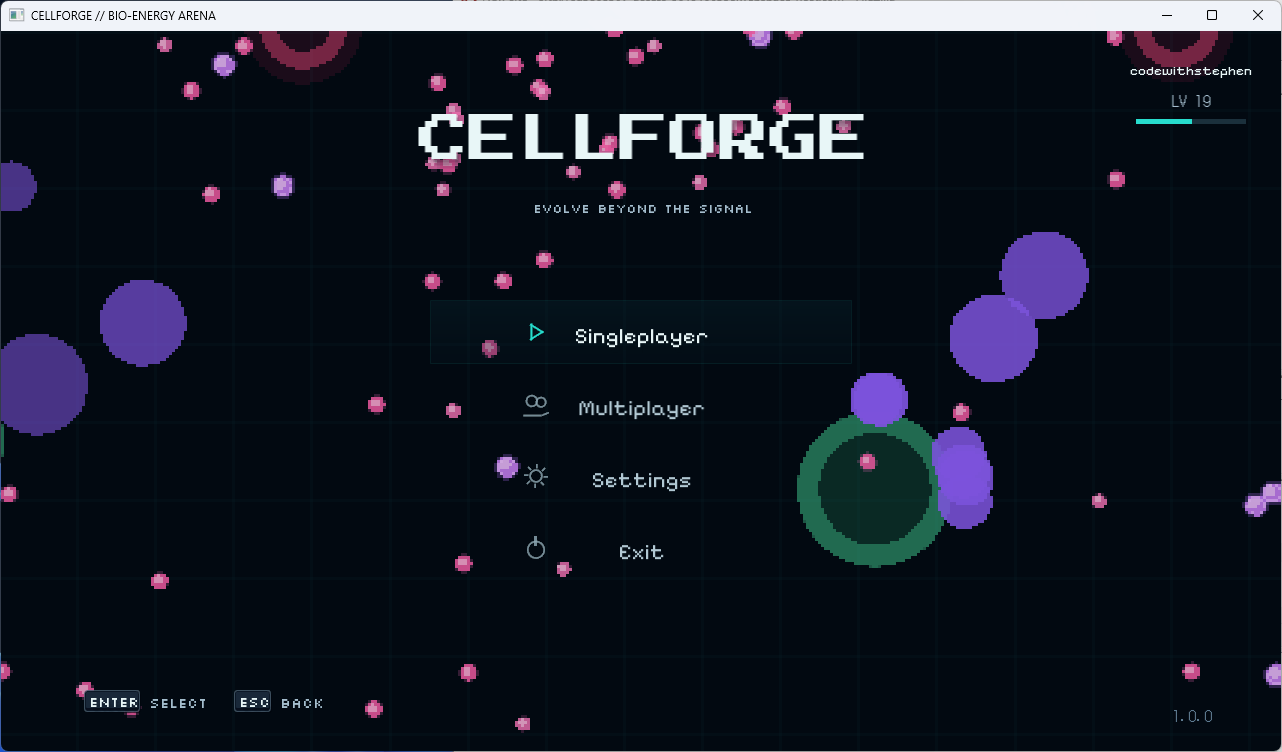
CELLFORGE
Evolve Beyond the Signal
CellForge is a fast-paced cell survival and evolution game where you consume, grow, split, outplay enemies and fight your way to the top of the arena.
Start as a small cell, consume energy scattered throughout the world, increase your mass and become powerful enough to hunt other cells — but the larger you become, the more dangerous the arena becomes.
Inspired by the classic cell-survival genre, CellForge expands the formula with its own progression systems, hazards, cosmetics, multiplayer infrastructure, dynamic world effects and account-based progression.
CellForge is currently in active development. Features, balancing, visuals and multiplayer systems may continue to change as the game develops.
🧬 GAMEPLAY
The goal is simple:
Consume. Grow. Survive. Dominate.
Food is scattered throughout the arena and provides mass while also contributing towards your account progression.
As your cell grows:
- Your mass increases
- Your cell becomes physically larger
- Your movement becomes slower
- Smaller players become potential prey
- Larger players become a serious threat
Knowing when to chase, escape, split or hide is the key to surviving.
⚡ SPLITTING
Split your cell to launch part of your mass towards your movement direction.
Splitting can be used to:
- Catch smaller players
- Escape dangerous situations
- Cover more of the arena
- Reach food faster
- Perform aggressive attacks
You can control multiple cell pieces at once.
Unlike the traditional instant merging system used by many cell games, CellForge uses a return system.
After enough time has passed, your split pieces begin travelling back towards your primary cell.
Returning pieces are visually connected to the main cell before eventually being reabsorbed.
Mass is preserved throughout the process.
💠 EJECT MASS
Players can eject part of their mass into the arena.
Ejected mass:
- Launches in your movement direction
- Gradually slows down
- Can be consumed
- Costs part of your current mass
This can eventually support more advanced strategies involving teammates, hazards and arena interactions.
☣️ HAZARDS
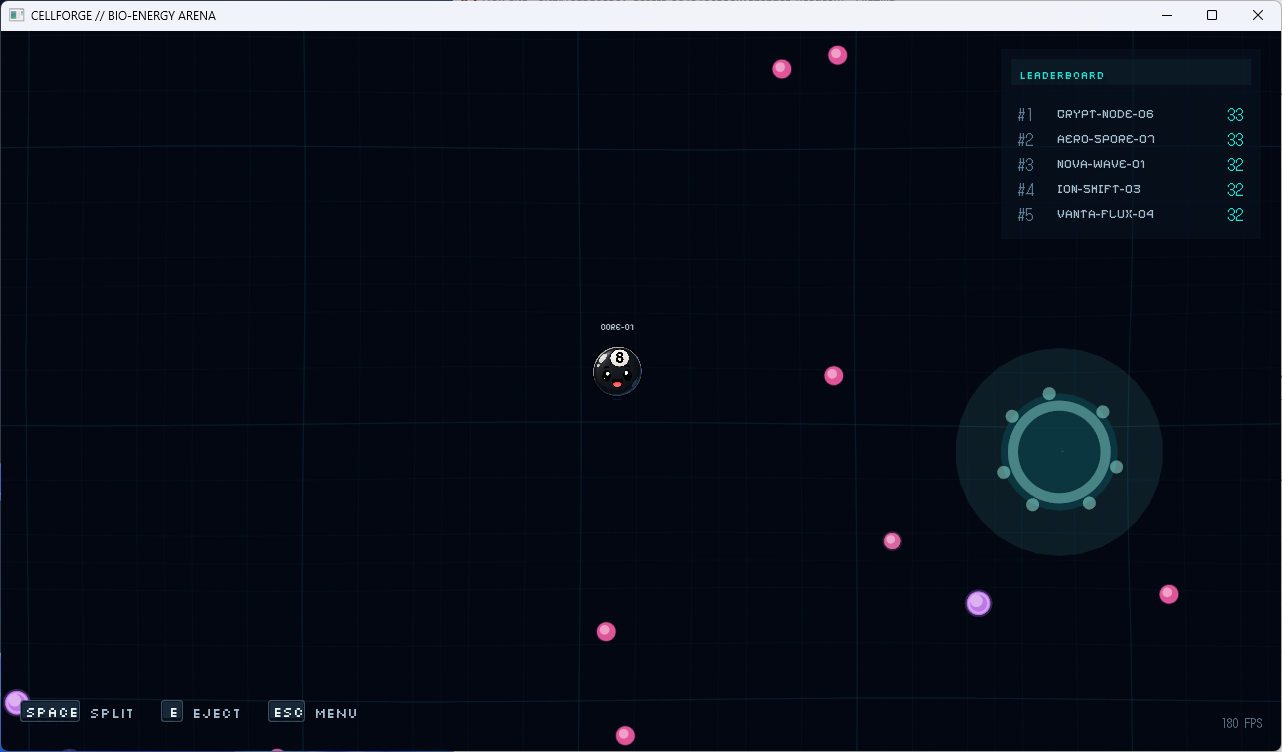
The CellForge arena contains several different environmental threats.
Each hazard has its own gameplay role, appearance, particle effects and interaction with the arena grid.
SPLIT / RUPTURE HAZARD
A dangerous unstable object that can cause large cells to fragment.
If a cell enters the hazard while large enough, it may be violently divided into multiple smaller pieces.
The resulting pieces still use the normal CellForge return and reabsorption system.
Triggering the hazard creates:
- Grid distortion
- Energy effects
- Particle bursts
- A visible shockwave through the arena
SHELTER
Not everything in the arena is trying to kill you.
Shelter objects can provide smaller cells with an opportunity to hide from much larger opponents.
Their visual effects are intentionally calmer, including:
- Gentle grid distortion
- Soft energy fields
- Ambient particles
Using the environment properly can be just as important as having more mass.
LETHAL HAZARDS
Some hazards should simply be avoided.
Lethal hazards remain stationary but can kill players that collide with them.
They use a much more unstable visual style including:
- Danger pulses
- Energy particles
- Grid deformation
- Strong shockwaves when triggered
Watch where you're travelling.
🌐 DYNAMIC ARENA GRID
The CellForge grid is more than just a background.
The arena uses a dynamic world-space grid capable of reacting to gameplay events.
Movement can subtly distort the world in the direction you're travelling, while major events can physically disturb the grid.
For example, explosions and hazard events can create an expanding ripple similar to:
dropping a stone into water.
The wave travels through the arena before gradually fading and allowing the grid to return to normal.
Different hazards can create different grid behaviour including:
- Radial waves
- Pulses
- Inward distortion
- Outward shockwaves
- Directional movement distortion
These effects are visual only and never alter the authoritative gameplay simulation.
✨ PARTICLE EFFECTS
Important gameplay events have their own visual effects.
Particles can appear during:
- Player splitting
- Reabsorption
- Player deaths
- Large player consumption
- Hazard activation
- Shelter interaction
- Lethal hazard events
- Split hazard events
Effects are deliberately restrained so the arena doesn't become visual noise.
Normal food consumption does not generate endless particle spam.
🍬 FOOD VARIANTS
Food across the arena can appear in different visual variants.
Food is an actual part of the authoritative world simulation and is shared correctly between multiplayer clients.
Consuming food:
- Increases your mass
- Removes the food from the arena
- Grants progression experience
XP Reward
1 Food = 1 XP
🏆 PLAYER VS PLAYER
Become large enough and you can consume smaller players.
But size matters.
You cannot simply touch every other player and consume them.
The attacker must have a sufficient mass advantage and enough overlap must occur before the smaller cell can be consumed.
Consuming another player or bot grants:
+10 XP
Your opponent's mass is transferred into the consuming cell.
🤖 BOTS
Singleplayer and multiplayer arenas can contain AI-controlled cells.
Bots use the same fundamental gameplay systems as real players.
They can:
- Search for food
- Hunt smaller cells
- Escape larger threats
- Avoid hazards
- Split when appropriate
- Navigate around the arena
- Compete on the leaderboard
Bots aren't intended to simply wander randomly.
They exist to make arenas feel alive even when player populations are lower.
🎮 SINGLEPLAYER
Want to play without connecting online?
Create your own local arena.
Configure options including:
- Player name
- Bot population
- Arena scale
- Food density
- Starting mass
- Bot difficulty
A live ecology preview lets you see how your selected configuration will affect the arena before starting.
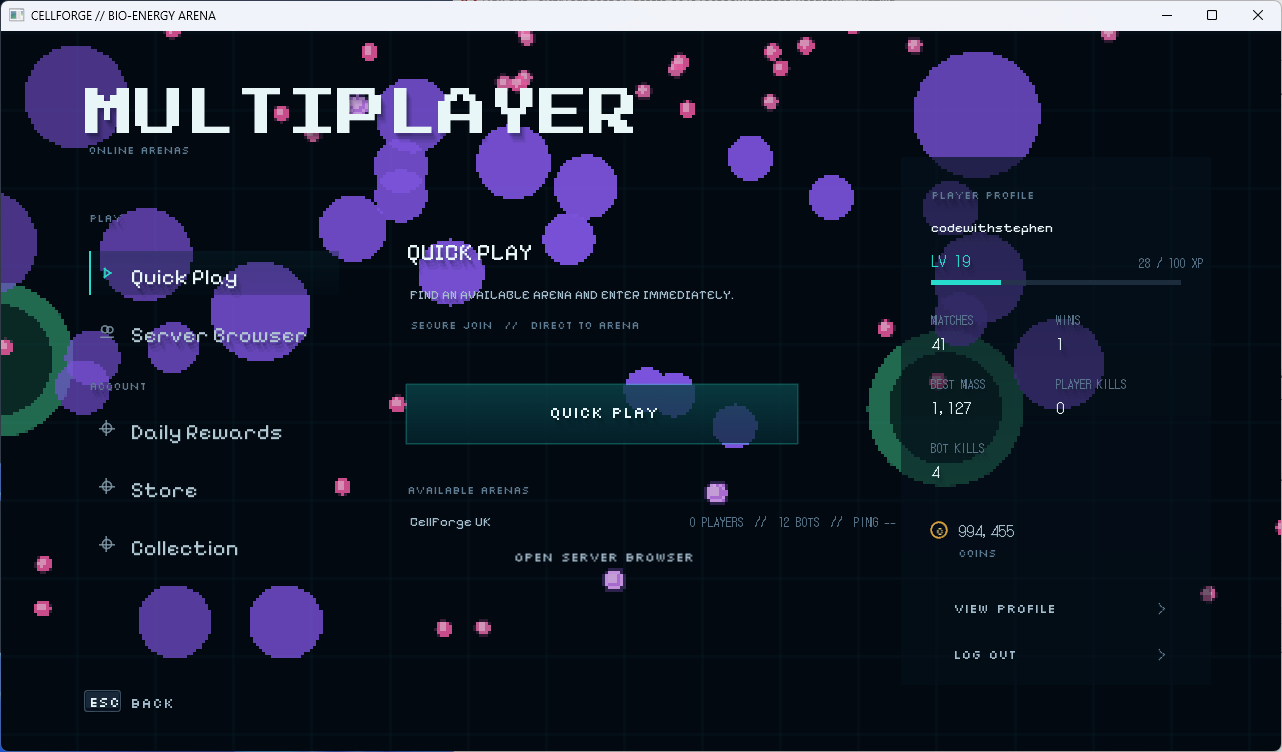
🌐 MULTIPLAYER
CellForge is being built around dedicated authoritative multiplayer servers.
The intended multiplayer flow is simple:
Multiplayer → Select Server → Connect → Spawn → Play
There is no unnecessary ready-up waiting lobby.
Players can join active arenas directly.
Multiplayer systems include:
- Quick Play
- Server Browser
- Dedicated servers
- Join-in-progress
- Bots filling unused population
- Human-player priority
- Connection/reconnection handling
- Server-side gameplay authority
- Kick and ban support
- Server status and compatibility information
The authoritative server controls important gameplay such as:
- Movement validation
- Mass
- Food
- Consumption
- Splitting
- Hazards
- Player state
- Bot simulation
The client does not decide its own authoritative progression or gameplay results.
👤 CELLFORGE ACCOUNT
Online progression is connected to your CellForge / CodeWithStephen account.
Your profile can track statistics including:
- Matches played
- Wins
- Best mass
- Players consumed
- Bots consumed
- XP
- Level
- Coins
- Cosmetics
Account information is displayed directly inside the Multiplayer section.
📈 LEVELS & XP
Playing CellForge earns experience.
XP Sources
Consume Food
+1 XP
Consume Player
+10 XP
Consume Bot
+10 XP
More progression rewards can also be earned through matches and other systems.
Maximum Level
LEVEL 1000
Progression is designed to provide a long-term goal rather than ending after a small number of levels.
🪙 CELLFORGE COINS
CellForge contains an in-game currency called Coins.
Coins are earned through gameplay.
They are not intended to require real-money purchases.
Coins can be earned by:
- Playing
- Levelling up
- Winning matches
- Progression rewards
- Daily rewards
- Other gameplay achievements
Coins can then be spent inside the:
CELLFORGE STORE
🛒 CELLFORGE STORE
Spend earned Coins on cosmetic customisation for your cell.
The Store contains cosmetics such as:
- Cell colours
- Animal Cells
- Object Cells
- Special designs
- Future unlockable cosmetics
Examples include:
- Dog Cell
- Cat Cell
- Pig Cell
- Rabbit Cell
- Fox Cell
- Bear Cell
- Frog Cell
- Cookie Cell
- Azure Core
- Emerald Core
Owned cosmetics are permanently added to your Collection.
🎨 COLLECTION
The Collection lets you manage cosmetics you already own.
You can:
- Browse unlocked cosmetics
- Preview them
- Equip them
- Change your active CellForge appearance
Your equipped cosmetic is also preserved when your cell splits.
Every piece continues to belong visually to the same player.
🎁 DAILY REWARDS
Return to CellForge regularly to claim Daily Rewards.
Rewards can include:
- Coins
- Progression rewards
- Unlockables
- Future cosmetic rewards
The reward system is designed to complement gameplay rather than replace it.
🔓 LEVEL UNLOCKABLES
Levelling isn't just a number.
Progression can unlock additional CellForge content as you climb towards Level 1000.
Unlockables can include:
- Cosmetics
- Cell designs
- Progression rewards
- Coins
- Special milestone rewards
🏅 ARENA RANKING
During gameplay, the live Arena Ranking shows the strongest cells currently competing.
The leaderboard tracks the active arena rather than your permanent account level.
Your permanent account progression and your current match ranking are separate systems.
Become the largest cell and take the #1 position.
📊 IN-GAME PROGRESSION HUD
Your current progression remains visible while playing.
The HUD can display:
- Current level
- Current XP
- XP needed for the next level
- XP gain feedback
- Level-up feedback
Rapid XP events are aggregated so the HUD doesn't flood the screen every time food is consumed.
🎮 CONTROLS
Default keyboard controls include:
Movement
Move towards your cursor / movement direction.
Split
SPACE
Eject Mass
E
Menu
ESC
Controls can be changed through the game's settings where supported.
🎮 CONTROLLER SUPPORT
CellForge's interface is being designed around full keyboard, mouse and controller navigation.
The UI automatically changes its input prompts depending on your active device.
Instead of generic text such as:
Press Button 1
CellForge uses proper input glyphs for:
- Keyboard keys
- Mouse buttons
- Xbox-style controls
- Other supported controllers
⚙️ SETTINGS
CellForge includes configurable options covering areas such as:
- General
- Video
- Graphics
- Audio
- Controls
- Gameplay
- Interface
- Accessibility
- Network
Video options can include:
- Display Mode
- Resolution
- Refresh Rate
- VSync
- Frame Rate Limit
- UI Scale
Graphics options include support for the game's visual effects and shaders.
♿ ACCESSIBILITY
CellForge includes accessibility-focused settings such as Reduce Motion.
Reduce Motion can tone down:
- Grid distortion
- Shockwaves
- Strong movement effects
- Particle motion
- UI animations
Important gameplay information remains visible even with additional effects reduced.
🎵 CELLFORGE RADIO
The frontend includes its own music player.
The CellForge Radio system supports:
- Track information
- Previous track
- Play / Pause
- Next track
- Playback progress
- Music volume
Music continues naturally while navigating compatible frontend screens rather than restarting every time a menu changes.
🔔 NOTIFICATIONS
CellForge has a non-blocking notification system for events such as:
- Settings Saved
- Signed Out
- Cosmetic Equipped
- Purchase Complete
- Profile Updated
- Coin rewards
- Progression events
- Network events
Notifications are separate from important confirmation dialogs and are designed to stay out of the player's way.
🖥️ BUILT WITH C#
CellForge is developed in C# using a custom/reusable SFML.Game.Framework foundation.
The game is being built with separate architecture for:
CellForge Client CellForge Dedicated Server CellForge Master Server Shared Gameplay / Networking Systems
Multiplayer uses an authoritative server model rather than trusting the client with important gameplay state.
🚧 DEVELOPMENT STATUS
CellForge is currently under active development.
This means you may encounter:
- Bugs
- Balancing changes
- Missing polish
- Networking issues
- UI changes
- Gameplay changes
- Server downtime
- Features still being completed
The game is being improved continuously.
If something feels unfinished, there's a good chance it's already on the list.
🧪 WHAT I'M CURRENTLY WORKING ON
Current development is focused heavily on:
- Gameplay polish
- Multiplayer responsiveness
- Dedicated server stability
- Grid effects
- Hazard effects
- Particle systems
- UI/UX improvements
- Account progression
- Store and cosmetics
- Performance
- Audio
- Networking
💬 FEEDBACK
Feedback is extremely useful during development.
If you find:
- A bug
- A performance problem
- A multiplayer issue
- A UI problem
- Something confusing
- A mechanic that doesn't feel right
please report it.
Detailed reports make problems considerably easier to reproduce and fix.
⚠️ PLEASE REMEMBER
CellForge is an in-development game.
Systems shown in screenshots, development builds or earlier versions may change.
Progression balancing, cosmetics, economy values, hazards and multiplayer behaviour may be adjusted as development continues.
❤️ THANK YOU
Thank you for checking out CellForge.
The project started as a cell-survival game experiment and has continued growing into a much larger project involving:
- Custom gameplay systems
- Dedicated multiplayer servers
- Account progression
- Cosmetics
- Dynamic world effects
- Hazards
- Bots
- Store systems
- Long-term progression
There's still plenty more to build.
Enter the arena. Consume. Evolve. Survive.
CELLFORGE
EVOLVE BEYOND THE SIGNAL
Download
Leave a comment
Log in with itch.io to leave a comment.